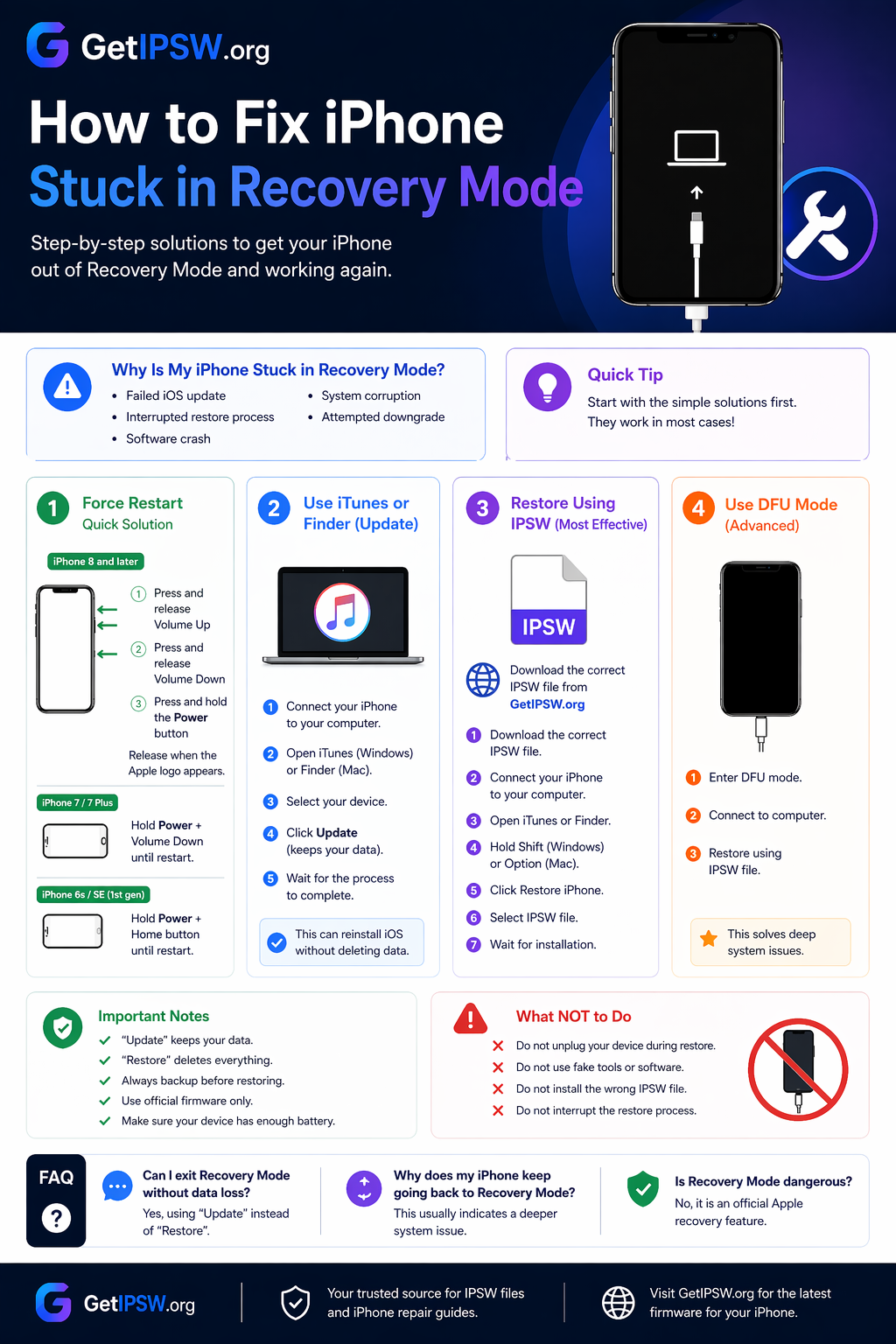
How to Fix iPhone Stuck in Recovery Mode (2026 Guide)
In this guide, you’ll learn the best methods to fix an iPhone stuck in Recovery Mode step by step.
How to Fix iPhone Stuck in Recovery Mode (2026 Guide)
Is your iPhone stuck in Recovery Mode and won’t exit? Don’t worry — this is a common issue and can usually be fixed.
In this guide, you’ll learn the best methods to fix an iPhone stuck in Recovery Mode step by step.
⚠️ Why Is My iPhone Stuck in Recovery Mode?
Your iPhone may get stuck in Recovery Mode due to:
Failed iOS update
Interrupted restore process
Software crash
System corruption
Attempted downgrade
👉 The device cannot complete the boot process.
🔧 Fix 1: Force Restart (Quick Solution)
Try this first — it works in many cases.
For iPhone 8 and later:
Press and release Volume Up
Press and release Volume Down
Press and hold the Power button
Release when the Apple logo appears
For iPhone 7 / 7 Plus:
Hold Power + Volume Down until restart
For iPhone 6s / SE (1st gen):
Hold Power + Home button
🔄 Fix 2: Use iTunes or Finder (Update Mode)
Connect your iPhone to your computer
Open iTunes (Windows) or Finder (Mac)
Select your device
Click Update (important: keeps your data)
Wait for the process to complete
👉 This can reinstall iOS without deleting data.
⚙️ Fix 3: Restore Using IPSW (Most Effective)
👉 If update fails, use IPSW restore.
Download firmware here:
iPhone 17 Series – https://www.getipsw.org/device/iPhone18,5
iPhone 16 Series – https://www.getipsw.org/device/iPhone17,1
iPhone 15 Series – https://www.getipsw.org/device/iPhone15,4
iPhone 14 Series – https://www.getipsw.org/device/iPhone14,2
iPhone 13 Series – https://www.getipsw.org/device/iPhone14,5
iPhone 12 Series – https://www.getipsw.org/device/iPhone13,2
iPhone 11 Series – https://www.getipsw.org/device/iPhone12,1
iPhone XS / XR – https://www.getipsw.org/device/iPhone11,8
iPhone SE – https://www.getipsw.org/device/iPhone12,8
Steps:
Download the correct IPSW file
Connect your iPhone
Open iTunes or Finder
Hold Shift (Windows) or Option (Mac)
Click Restore iPhone
Select IPSW file
Wait for installation
🔥 Fix 4: Use DFU Mode (Advanced)
If Recovery Mode doesn’t work:
Enter DFU mode
Connect to computer
Restore using IPSW
👉 This solves deep system issues.
⚠️ Important Notes
“Update” keeps your data
“Restore” deletes everything
Always backup before restoring
Use official firmware only
🚫 What NOT to Do
❌ Do not unplug your device during restore
❌ Do not use fake tools
❌ Do not install wrong IPSW file
❓ Frequently Asked Questions
Can I exit Recovery Mode without data loss?
Yes, using “Update” instead of “Restore”.
Why does my iPhone keep going back to Recovery Mode?
This usually indicates a deeper system issue.
Is Recovery Mode dangerous?
No, it is an official Apple recovery feature.
🧠 Final Thoughts
An iPhone stuck in Recovery Mode can be frustrating, but it is usually fixable.
Start with simple methods, then move to IPSW restore or DFU mode if needed.
Explore more guides on GetIPSW to fix, restore, and manage your iPhone easily.
You Might Also Like
Apr 24, 2026
iCloud Bypass iPhone 6: Complete Guide & Safe Methods (2026)
If your iPhone 6 is stuck on the Activation Lock screen, it can be frustrating—especially if you forgot your Apple ID or purchased a second-hand device.
Read more →
Apr 25, 2026
iPhone Battery Draining Fast? 12 Proven Fixes That Actually Work (2026)
If your iPhone battery is draining faster than usual, you're not alone. This is one of the most common issues affecting both new and older iPhone models.
Read more →
May 16, 2026
iOS 15.8.8, iOS 16.7.16 and iOS 18.7.9: Why Apple Still Updates Older iPhones
Learn why Apple released iOS 15.8.8, iOS 16.7.16 and iOS 18.7.9 for older iPhones, which devices are supported, and how to download IPSW files safely.
Read more →